
No separate mobile application is required. Check the address before entering credentials, particularly after following an old bookmark or a message link.
Cocoa Casino welcome bonus100% up to €1,000 · 18+ · Terms apply
Play at Cocoa CasinoCocoa Casino Login key facts
The sign-in route combines a reusable account credential with optional two-step protection and event-based identity checks.
| Access feature | Details |
|---|---|
| Primary login | Email address and password |
| Regional alternative | Phone login in some locations |
| Two-factor option | Authenticator app or SMS |
| Password reset | Email link or SMS code |
| Desktop support | Chrome, Firefox and Safari |
| Mobile support | iOS and Android browser |
| Inactive session | Automatic logout |
| Customer help | Live chat and email 24/7 |
Signing in from a desktop browser
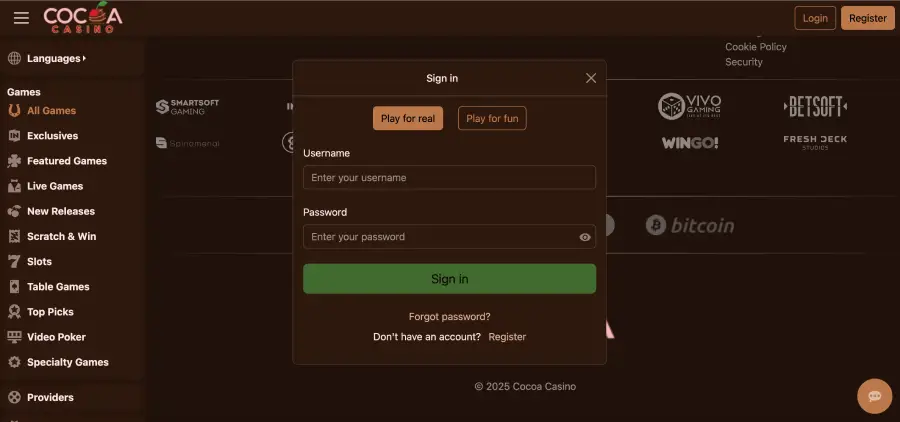
Start with the credentials originally attached to the profile. Repeated guesses can turn a typing mistake into a security review, so use recovery when the password is uncertain.
- Open Cocoa Casino in a supported browser.
- Select the login control rather than the registration form.
- Enter the account email and password.
- Complete the second-factor prompt when configured.
- Allow the profile dashboard to load fully.
- Check recent balance and account information before proceeding.
A phone number can replace email only where the regional form presents that option and the number is already linked. Switching between identifiers does not repair an incorrect password. Use the method chosen when the profile was created.
Registering instead of logging in
Registration creates a new account; login returns to one that already exists. A player should have a single profile with identity information that will later match payment and KYC records.
- Choose Register from the Cocoa Casino page.
- Supply an email address that will remain accessible.
- Create a long password not used on another service.
- Fill in the requested personal information accurately.
- Read and accept the account terms.
- Confirm the email message and enter the new profile.
- Configure two-factor security before using the cashier.
The welcome package matches 100% up to 1000 EUR and adds 50 spins for new accounts. It begins with a 20 EUR qualifying payment and carries 35x rollover. Account creation and bonus acceptance are separate decisions, so review the offer before the first deposit.
Resetting a forgotten password
The reset tool replaces the old password without altering the rest of the profile. Email is the standard recovery route, with SMS available where phone access is supported.
- Select the forgotten-password link on the login form.
- Enter the registered email or eligible phone number.
- Open the latest reset message or read the SMS code.
- Follow the prompt and set a new unique password.
- Return to login and enter the replacement credential.
- Review two-factor and session settings after access returns.
Only the newest reset request may remain usable, so avoid sending several in quick succession. Check junk mail and the exact spelling of the address if no message arrives. Live chat and email support operate 24/7 when the automated route cannot identify the account.
Two-factor authentication and session control
Two-factor authentication is optional and can be enabled in the profile through an authenticator app or SMS. It adds a temporary code after the password, making possession of one credential insufficient for entry.
- Keep the authentication device under the account holder’s control.
- Never dictate a current code to another person.
- Update the linked phone before losing access to its number.
- Check device time when authenticator codes fail repeatedly.
- End the session manually on a shared computer.
Cocoa Casino also closes a session after inactivity. That control protects an unattended page but should not replace manual sign-out. After a password reset, inspect the account for changes and terminate any device session that is not recognised.
Mobile login on Android and iOS
The same profile opens in a mobile browser. Cocoa Casino has no native app, so a download, APK or App Store package is unnecessary.
Use an updated version of Chrome, Firefox or Safari and permit the cookies required for the account session. If a blocker prevents the form from appearing, pause that extension for the checked site instead of installing substitute software.
The Cocoa Casino mobile guide explains home-screen bookmarks, browser payments and fake download warnings. A home icon still opens the web account and uses the normal password.
KYC and account verification
Verification can appear when the profile is completed, a payment is processed or unusual activity is detected. KYC connects the registered person to the payment method and account activity.
- Ensure personal names match the identity record.
- Use current, readable documents in the secure profile area.
- Provide address evidence that belongs to the account holder.
- Use cards, wallets and bank details in the same name.
- Respond to the specific review notice before retrying payment.
Creating another profile will not bypass a KYC request and can add a duplicate-account issue. Contact support if a registered detail needs correction. The Cocoa Casino payments guide covers first-withdrawal checks and transaction delays.
Diagnosing access problems
Identify the stage that fails before changing the account. Credentials, browser behaviour, second-factor codes and verification each require a different response.
| Symptom | Likely check | Next action |
|---|---|---|
| Password rejected | Email, capitals and keyboard layout | Use password reset |
| 2FA code refused | Device time and active method | Generate a fresh code |
| Login form missing | Browser version, cookies, blocker | Open a clean page |
| Session ends quickly | Inactivity or cookie restrictions | Sign in again after adjusting settings |
| Account under review | KYC or unusual-activity notice | Complete the requested verification |
| Reset email absent | Inbox, junk folder and spelling | Contact support after one valid request |
Do not follow a link promising to bypass a block. Provide support with the error text and the account email, but keep the password and temporary authentication code private.
Security after login
The dashboard holds personal details and payment history as well as game access. Use a password manager, lock the device and review unfamiliar transactions promptly.
Messages offering help through screen-sharing software should be rejected. Account support can investigate through its own channels without taking remote control of the phone or computer.
Cocoa Casino is restricted to adults aged 18 and over. Decide both a time limit and a payment limit before opening the account. Sign out when either is reached and visit responsible gaming for practical control and support options.
Cocoa Casino Login FAQ
These answers cover account entry, recovery, mobile use and verification.
Which credentials does Cocoa Casino Login use?
The standard method is email and password. Phone login is available in some regions, while two-factor security can add an authenticator or SMS code.
How is a forgotten password recovered?
Open the reset tool, use the email link or SMS code sent to the registered contact and create a different password.
Does Cocoa Casino Login work on a phone?
Yes. Android and iOS browsers support the account, and no dedicated application is required.
Why did the account sign out automatically?
Sessions close after inactivity. Return through the normal login form and always sign out manually on a shared device.
Where is two-factor authentication enabled?
It is an optional profile setting using an authenticator app or SMS. Keep control of the configured device and number.
When does Cocoa Casino request KYC?
Verification may be triggered during profile completion, payments or a review of unusual activity.
Which support channels handle a login block?
Live chat and email are available 24/7. Include the error details but never send a password or current second-factor code.